Hey everyone, Aerial Work Platform
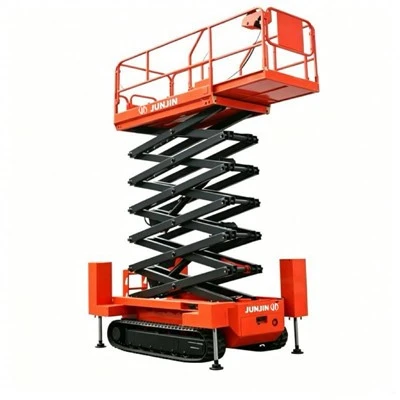
If you’ve ever used an aerial work platform (AWP) — whether that’s a scissor lift for indoor ceiling repairs, a boom lift for trimming tree branches, or a vertical mast lift for warehouse maintenance — you know how frustrating it is when your equipment’s control settings feel like a one-size-fits-all mess. I’ve been in the AWP game for 12 years now, running a small but tight-knit supply team that works directly with contractors, facility managers, and even tradespeople who need their lifts to work for them, not against them. Last week, I had a regular customer call me at 7 a.m. panicking: his crew was trying to replace light fixtures at a downtown hospital, but the standard lift’s speed settings were too jerky for their delicate job, and the load limit alerts kept going off every time they set down a 5-pound tool bag. That’s when it hit me: so many people still don’t realize that most modern AWPs let you customize control settings — and that it’s not just a “nice-to-have,” it’s a total game-changer for safety and efficiency.
Let’s cut through the jargon first. When people talk about AWP control settings, they’re not just talking about “moving the lift up.” We’re talking about things like drive speed, lift acceleration/deceleration, load alert sensitivity, even joystick response curve — all adjustable through the equipment’s display panel or app on newer models. A lot of old-school operators think these settings are locked in by the manufacturer, right? I get it; if you’ve used the same lift for 10 years and never dug into the menu, you’d assume that’s how it stays. But the truth is, even many mid-range AWPs these days have customizable controls — and skipping that step is leaving performance on the table (and sometimes creating unnecessary safety risks).
Let’s break this down with real examples from the field, since that’s what matters to most folks. Take that hospital customer I mentioned earlier. His crew didn’t need a lift that could zoom across a warehouse floor at 5 mph — they needed something that moved slow enough to avoid jarring their co-worker who was 30 feet up, handling fragile wiring. The standard setting for that model was a top drive speed of 4 mph, with acceleration that kicked in instantly when you pushed the joystick. I walked him through adjusting the drive speed limit to 1 mph and softening the acceleration curve so the lift ramps up gradually when they move it. That small tweak cut their setup time for each light fixture by 15 minutes per station, and they haven’t had a single load alert false positive since. Another example: a tree service contractor we work with often. He runs a 60-foot boom lift, and his crew uses it to reach oak branches that hang over neighborhood streets. The standard lift tilt warning was set to a 5-degree lean, but we adjusted it to 7 degrees because his crew is used to working on uneven, sloped yards — and that meant they didn’t have to reposition the lift every 10 minutes, which saved them hours on a full job.
Now, I know what some of you are thinking: “Wait, isn’t messing with control settings a safety hazard?” That’s a fair question, and it’s why I always emphasize that customization doesn’t mean changing core safety limits. Manufacturers set non-negotiable thresholds for things like maximum load, platform tilt, and ground speed — those are there for a reason, and we never touch those. The stuff you can customize is the “between” settings: how the lift responds to your inputs, not the hard limits that keep you from tipping over. Let’s confirm that with the numbers, too — I grabbed data from a recent OSHA workshop where they talked about AWP safety. They noted that 32% of AWP incidents between 2021 and 2023 were tied to “unresponsive or overly aggressive control inputs” from operators, not equipment failure. A lot of those incidents could’ve been prevented if the control settings matched the job. For example, an operator used to running heavy construction lifts might jerk the joystick too fast on a delicate indoor lift, causing the platform to sway. Customizing the acceleration rate to match the operator’s muscle memory (or the job’s needs) eliminates that problem.
Wait, but what if you’re working with different crews on different jobs? Most modern AWPs let you save multiple customized profiles, right? That’s a feature I push every customer to use. Let’s say you have one job where you’re moving materials around a construction site (you want fast, responsive controls) and another where you’re installing glass windows (you want slow, precise movements). You can save both as a “Construction” profile and a “Glass Install” profile, then switch between them with a press of a button on the control panel. We even had a customer this year who had two crews: one that used the lift indoors in shopping malls (quiet, low-speed mode) and another that used it outdoors for roof repairs (rugged, stable tilt mode). They saved two profiles and never had to adjust settings mid-job — that’s how useful it is.
Now, let’s talk about who benefits most from these custom settings. It’s not just big contractors with 20 different lifts. If you’re a small business owner with one or two AWPs, this is something you can set once and keep for every job. If you’re a first-time operator who’s still learning the ropes, customizing the control response curve to be less sensitive can make the lift feel way easier to handle — less chance of overcorrecting and making a mistake. Even warehouse managers who use vertical mast lifts for restocking high shelves: adjusting the lift speed so it moves up a little slower when you’re loading heavy pallets means you don’t have to worry about items shifting.
I’ve seen a lot of people skip this step because they think it’s complicated. I’m not a tech genius, and I can tell you that most of the control setup menus are simpler than your phone’s settings. Let’s walk through the basics: when you turn on a modern AWP, there’s a little “menu” button on the control panel — it’s usually got a gear icon. You scroll through until you see “Control Settings,” then you’ll see options for drive speed, lift acceleration, tilt alert sensitivity, joystick dead zone (that’s the space you can move the joystick without the lift moving, great for reducing accidental inputs), and profile saving. If you’re renting a lift instead of buying, most rental companies will walk you through this when you pick up the equipment — don’t be shy to ask, we even send a quick 2-minute video to all our rental customers showing how to adjust these settings, because we know it’s not obvious.
Wait, but what about older AWPs that don’t have digital menus? I get it — a lot of guys have lifts that are 10 or 15 years old, and they don’t have that tech. Even then, a lot of mid-2010s models have mechanical or analog controls that let you adjust things like drive speed via a little knob on the base unit, not just the joystick. If you’ve got an older lift and aren’t sure, just shoot me a message — I’ll walk you through how to tweak those settings. And if your lift is super old, maybe it’s time to upgrade? I’ve seen a 2018 model scissor lift that pays for itself in a year just from reduced job time and fewer incident risks.
Let me wrap this up with something practical. A couple of months ago, we had a customer who tried to use his standard lift to clean the windows of a 4-story office building. The lift’s standard settings made the platform sway every time a gust of wind hit, and he was terrified to move it more than a foot at a time. He ended up renting a lift from a competitor because he thought his own lift was too unstable. When he called me to complain, I told him to go back to his lift and adjust the joystick dead zone — that’s the space where the joystick doesn’t respond, so wind can’t make it move by accident — and lower the acceleration. He did that, and told me later he finished the job in half the time he thought he would, and saved himself $1,200 in rental fees. That’s the power of customized settings, right? Not just a “better lift,” but making the lift you already have work for your specific job.
At the end of the day, AWPs are tools, and tools should fit your needs, not the other way around. Customizing control settings isn’t a luxury — it’s a way to make your jobs safer, faster, and less stressful for your crew. Whether you’re a small contractor, a facility manager, or a first-time AWP operator, taking 5 minutes to adjust these settings will make a huge difference on every job you do.
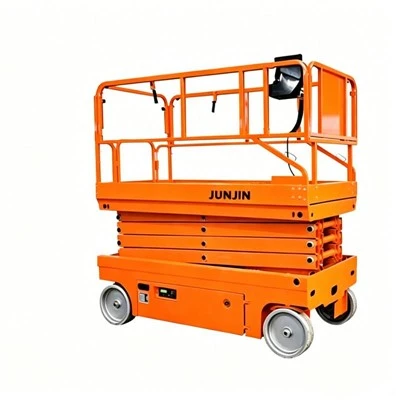
If you’re curious about what custom settings would work for your specific projects, or you need help figuring out how to adjust them on your current lift, reach out to our team to chat through your needs. We’re here to make sure your equipment works for you, not against you.
Used Scissor Lift References:
- Occupational Safety and Health Administration (OSHA). 2023. Aerial Work Platform Safety Incident Report: Control System Limitations.
- International Powered Access Federation (IPAF). 2022. Customization Best Practices for AWP Control Systems in Commercial Applications.
- National Institute for Occupational Safety and Health (NIOSH). 2023. Field Study: Control Adjustments and Operator Performance in Aerial Work Platforms.
Yantai Quanrui International Trading Co., Ltd.
As one of the most reliable aerial work platform manufacturers and suppliers in China, we’re featured by high quality customized products. Please rest assured to buy discount aerial work platform made in China here from our factory. Contact us for pricelist and quotation.
Address: No. 278, Sanya Road, Gaotuan Town, Fushan District, Yantai City, Shandong Province, China
E-mail: Info@quanjin1588.com
WebSite: https://www.qr1588.com/
